
| KPI | Target |
|---|---|
| First-attempt entry rate | > 95% |
| “I can’t find the door” calls | less than 5% per stay |
| Host time per check-in | downward trend |
| “Arrival” sub-criterion rating | 4.9+ |
Operations
Check-inBattery LifeOperations
Self-Check-In for Vacation Rentals: Locks, Key Boxes, and Digital Guest Guides
A Complete Guide to Self-Check-In and Self-Service Check-In for Short-Term Rentals: Key boxes, smart locks, arrival instructions, and a contactless digital guidebook.
Équipe Majordia

Are you still having to go out every time a guest arrives to hand over the keys in person? If so, you’re losing an average of 1 to 2 hours per check-in (including travel time), or 15 to 30 hours per month for a property with a 60% occupancy rate. That’s time—and money—you could be investing elsewhere.
Self-check-in is no longer an option—it’s an expectation. According to a 2025 Guesty study, 78% of Airbnb guests prefer self-check-in. Here’s how to set it up correctly, avoiding common pitfalls—and linking the process to your welcome booklet.
Why switch to self-check-in?
Beyond saving time, self-check-in offers many benefits that hosts often underestimate. You gain flexibility with check-in times: you can welcome guests arriving at 11 p.m. or 2 a.m. without having to go anywhere. You gain scalability: it’s impossible to hand-deliver keys for ten listings on the same day. Your guests enjoy greater satisfaction—no waiting, no scheduling coordination, no stress. Your Airbnb rating often improves in the “arrival” category when self-check-in is well documented. Finally, additional revenue becomes possible: late arrivals no longer require you to make a trip.
The 4 Self-Check-In Solutions
Solution 1: The combination lockbox (€10–40)
The simplest and cheapest solution. Mounted near the door, it holds the key to the property and opens with a code that you provide to the guest. Popular brands include Master Lock and Burglar.
The price is unbeatable, and installation takes five minutes. No technology is required on the guest’s end, and the system works even during a power outage or internet outage. However, the code is fixed (ideally, it should be changed manually between each stay), it may not look very attractive on an exterior wall, and the box can freeze in winter in some regions.
Astuce
Change the code after each guest. If you can’t, change it at least once a month. A dishonest former guest might return. Write down each code in a notebook to keep track of access.
Solution 2: The Smart Lock (€80–250)
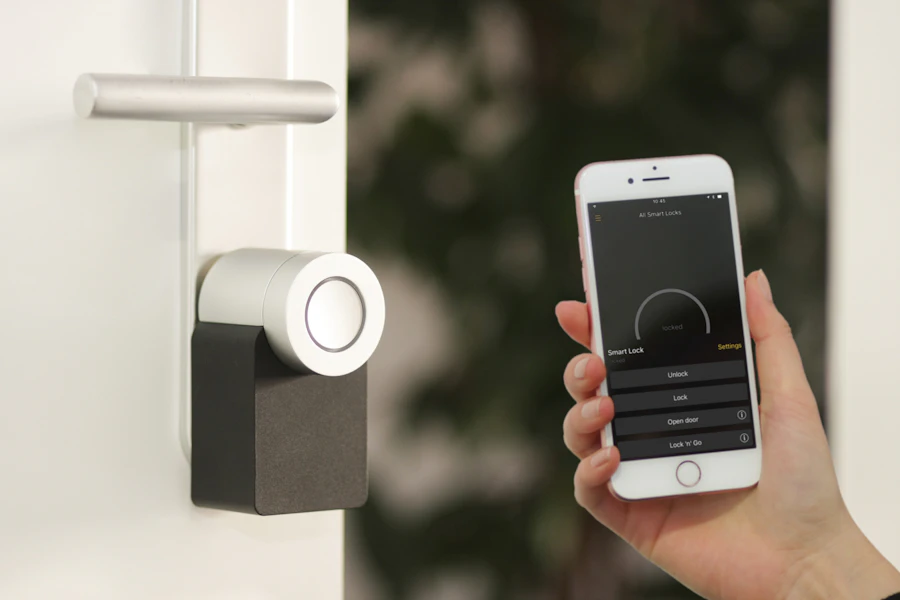
Nuki, Yale, August, Igloohome… Smart locks are the industry standard. They automatically generate temporary codes, lock and unlock remotely, and integrate with calendar synchronization tools.
Unique codes for each guest are generated and expire automatically. You have access to an access history (who entered, when, and for how long) and can lock and unlock the door remotely from your smartphone. Integration with a calendar sync tool, property management software (PMS), and Majordia simplifies management. The absence of a physical key eliminates the risk of loss. The purchase price is higher (paid off in 3 to 6 months), batteries need to be replaced (lasting 6 to 12 months depending on the model), and installation is a bit more technical—but doable on your own.
Astuce
The Nuki Smart Lock is our recommendation for individual hosts: easy to install (no lock modification required), automatic codes via Nuki Web, and native Airbnb integration. Price: ~€150.
Solution 3: The Keypad (€50–150)
The keypad, mounted on the door or gate, works on the same principle as a key box but without a physical key. The guest enters a code and goes straight in. It’s ideal for buildings with intercoms or apartment complexes.
Keypads are particularly well-suited for access gates or condominium gates. Combined with a key box or a smart lock for the front door, they form a two-tiered system that secures access to the building.
Solution 4: The Smart Intercom/Video Doorbell
Ring, Doorbird… A visitor rings the bell, you check your phone, and open the door remotely. This is a premium solution that requires a reliable internet connection and electrical wiring.
The unique advantage: you can see who’s at the door. This provides peace of mind regarding security and offers a personalized touch when welcoming guests remotely. The downside: if your internet connection goes down, the guest is locked out.
Take action — Create your guide for free: 1 property, 6 tiles, no credit card required.
The Crucial Role of the Digital Welcome Guide
No matter which check-in solution you choose, its success depends on the clarity of your instructions. That’s where the digital welcome guide makes all the difference. An access code sent via text message often gets lost in a conversation history. In a digital welcome guide, it’s always accessible, copyable, and illustrated.
Your guide should include step-by-step photos of the route (from the parking lot, the sidewalk, etc.), a one-click copyable access code (no more typos on a keypad at 3 a.m.), a demonstration video of the lock if necessary, the exact geolocation of the front door (not just the address—the precise GPS coordinates), backup instructions in case of problems, and an easily accessible emergency number.
Astuce
The most effective access guide we’ve seen: a series of 5 photos taken from the traveler’s perspective, from the street to the front door, with green arrows on each photo. First-try success rate: 99%.
The Pitfalls of Self-Check-In
Self-check-in isn’t without its risks. Here are the most common problems and how to avoid them.
If the traveler can’t find the key box, include a photo with an arrow and a detailed description in the booklet. If the code doesn’t work, make sure to always double-check and provide a clearly visible emergency number. If the guest arrives earlier than expected, provide clear instructions on the check-in time and offer an early check-in for a fee if the accommodation isn’t ready. In case of a dead battery in the lock, keep a spare key with a neighbor and set up a low-battery alert. Finally, if the guest doesn’t read the instructions, send an automated message 24 hours in advance with a direct link to the access section.
Setup Checklist
To implement a reliable self-check-in system, follow this checklist:
- Choose the access system that best suits your property and your budget.
- Install and test the system with a friend before your first guest arrives.
- Take photos and videos of the key drop-off process for the guest handbook.
- Create the instructions in Majordia (Access/Check-in tile).
- Set up automatic sending of instructions 24 hours before arrival.
- Have a Plan B ready (spare key with a neighbor, emergency contact number).
- Test the route at night (visibility of door numbers, lighting).
- Train your housekeeping team to reset the system after each guest’s departure.
Budget and ROI
Here’s a quick calculation of the return on investment for a self-check-in system. The cost ranges from €10 to €250 depending on the solution chosen (one-time investment). The time saved is approximately 1.5 hours per check-in, or 22.5 hours per month for fifteen check-ins. If your time is worth €25 per hour, this represents €562 per month in recovered value. The most expensive solution (a smart lock for 250 €) pays for itself in two weeks. The additional revenue comes from the possibility of late check-ins, which allows you to accept more reservations.
FAQ
Self-check-in = a less welcoming experience?
No: you’re shifting the focus to the clear guide and 24/7 availability. A staff member steps in only for exceptions.
Key box or smart lock for a one-bedroom apartment?
Start with a key box for < €50 to test it out. Upgrade to Nuki or an equivalent system once you reach 10+ check-ins per month—see the smart lock guide.
What if the code doesn’t work at 11 p.m.?
Display a visible emergency number in the guest booklet, keep a spare key with a neighbor, and test the procedure before peak season.
What if the guest arrives 2 hours early?
Communicate the check-in time and offer a paid early arrival service if the calendar allows it—see paid services.
Is a video necessary in addition to photos?
A video is helpful for unusual locks. Five photos with arrows are often enough (99% success rate cited in the article).
Does Majordia send the codes automatically?
Set up the codes to be sent 24 hours in advance with a link to the access section. Link the actual dates from your PMS to avoid double bookings.
Real-World Examples
2 Apartments in Bordeaux — Nuki + Guidebook
Setup: Automatic codes via Nuki, photos of the access route, a message sent one day before arrival with a link to the guidebook.
Result: 20 hours saved per month, 5-star “check-in” rating.
Property management for 8 units — no more back-and-forth
Setup: Smart locks throughout the entire property, a cleaning checklist that resets codes between stays, QR code in the lobby.
Result: Weekends freed up for the team.
Building with digital keypad + key box
Setup: digital keypad on the gate and key box at the entrance, with two access levels documented in the handbook.
Result: Fewer calls saying, “I’m standing in front of the gate.”
Useful Links
To learn more, check out the features, the welcome booklet guide, the QR code, the smart locks guide, preventing double bookings, best practices for 5-star reviews, pricing, and a video call.
Success Metrics to Track
Review the 5 photos of the route after any roadwork or changes to the gate code: this is the number one cause of decline in the spring.
FAQ — Self-Check-In
Do I need to be reachable 24 hours a day on the day of arrival?
Yes, for genuine emergencies (locked out, power outage, leak), but 80% of requests are questions already covered in the handbook. An incident protocol combined with the AI Butler reduces the number of times you’re woken up.
How should I handle early arrivals?
Block the cleaning slot in the management software; offer an early check-in for a fee if the unit is ready; otherwise, send an automated message with luggage storage instructions—never send a code before cleaning is confirmed.
What if the guest doesn’t have mobile data?
Provide a QR code poster in the lobby, a pre-arrival text message with a link, or a tablet at the front desk. The guest register can be completed on-site if the online form fails.
Self-check-in and Declaloc?
Self-service access does not exempt you from the registration requirement for furnished vacation rentals. Display the registration number in the guest booklet and on the listing.
Create a guest log · Video demo · Check-in & guest log FAQ
Safety and Compliance
Self-check-in shouldn’t mean “no one is responsible.” Keep an emergency contact number, a plumber/electrician contact, and a stay incident protocol. Make sure codes aren’t reused among guests on traditional key boxes—change the code or switch to smart locks as soon as your portfolio exceeds three properties.
Choosing the Right Solution for Your Needs
For a downtown studio with fewer than ten check-ins per month, a key box with clear instructions in the guest handbook is often enough to get started. For a one- or two-bedroom apartment with a steady flow of guests, a smart lock becomes cost-effective as early as the second month. For a multi-property concierge service, standardize on a single model (Nuki, Igloohome, or equivalent) to simplify staff training and battery replacement.
In a condominium building, check the rules before installing a key box on the exterior wall. A digital keypad on the gate, combined with a smart lock at the entrance to the unit, often better complies with condominium regulations while offering fully self-service access.
Integrate self-check-in into your guest experience
Self-check-in isn’t limited to the access code. It’s part of a broader journey: a confirmation message with a link to the guest handbook, a reminder one day before arrival with the time the code will be sent, a message on the day of arrival with access details, and a follow-up on the first night to ensure everything is working properly. Each step reduces the number of calls and improves the “arrival” rating.
If you use a PMS or channel manager, link the automatic sending of codes to the actual reservation dates. A code sent too early poses a security risk; a code sent too late results in a call at 11 p.m. The ideal window is 1 to 3 hours before the check-in time, unless you have a documented 24/7 check-in process with a tested backup procedure.
Maintaining Your System Over Time
A well-established self-check-in system will deteriorate without regular maintenance. Check the batteries in the smart lock every quarter. Test the code for the key box after every change. Update the photos in the manual after any roadwork, changes to the door number, or modifications to the building’s digital lock code. Train each new member of the housekeeping team to restore the system to its original state after each guest’s departure: key returned to the box, code reset, lock secured.
This preventative measure costs less than a single emergency call on a Saturday night, when the guest is standing at the door and you’re a hundred kilometers away.
All articles
Partager :
Essai gratuit
Prêt à passer au livret digital ?
1 mois gratuit : carte proposée à l’inscription (facultative). Votre livret est prêt en quelques minutes.
Créer mon livret gratuitement


