
Good Wi-Fi is one of the first things a traveller looks for in a listing, and bad Wi-Fi is one of the first things that pull a rating down. But offering a connection to your guests raises two questions few hosts ask themselves: how do you secure it, and what does the law say about your guests' connection data?
This article answers with official sources read for the occasion: the pages of the French data-protection authority (CNIL) on public internet access and on protecting the network, the "Sécurisation des réseaux Wi-Fi" sheet from the French national cybersecurity agency (ANSSI), the 10 September 2026 press release from the telecoms regulator Arcep on fixed networks, and Airbnb's help pages. It is not legal advice: none of these pages explicitly deals with the case of a tourist holiday rental, and we say so where it matters.
Last verification of sources: 14 October 2026. Check your own situation, in particular for the legal part.
Which rules apply to Wi-Fi offered to guests?
Wi-Fi offered to guests raises two separate subjects: the technical security of the network, for which ANSSI and the CNIL give precise guidance, and the retention of connection data, which is a legal obligation for certain places that offer internet access to the public. The technical guidance is made up of official recommendations that any host can apply; the retention obligation depends on the status of whoever offers the access, and that is the least clear part for a holiday-rental host.
| Subject | Official source read | Nature |
|---|---|---|
| Encryption, guest network, WPS | ANSSI, CNIL | Security recommendations |
| Retention of connection data | CNIL (page of 17 July 2024) | Obligation for places offering access to the public |
| Speed shown in the listing | Airbnb (help) | Platform rule |
| National fibre coverage | Arcep (10 September 2026) | Statistics |
Does a holiday-rental host have to keep guests' connection data?
The answer depends on the host's legal status, and no official page we read gives it for a tourist holiday rental. The CNIL writes that organisations that offer internet access to the public, "such as municipalities, bars, restaurants, cafés, fast-food outlets, trains, hotels", are subject to retention obligations for "traffic data": technical information such as the device's IP address and the date, time and duration of each connection. The CNIL page, published on 17 July 2024, mentions neither gîtes, nor furnished rentals, nor guest houses. We could not read the legal text itself (the Légifrance website refused access), so we cannot say whether an individual who rents out a holiday home falls within its scope.
For those who are covered, the CNIL sets out the durations on its page and in its question-and-answer sheet:
| Data | Retention period given by the CNIL |
|---|---|
| Technical connection data (IP address and associated port, device identifiers) | 1 year |
| Account-creation information (username, pseudonym, password-related data) | 1 year |
| Civil identity (surname, first name, date and place of birth, address, email, phone) | 5 years, only if the organisation chooses to identify users |
| Network security data (date, time, duration of each communication) | 3 months at most |
Three points from the CNIL are worth keeping in mind. First, the organisation offering the access is in principle not required to record the identity of its customers in order to provide a connection, for example with open Wi-Fi: it then keeps only the technical data. Second, these obligations do not cover the content of messages or the pages visited. Third, this data is personal data: users have a right of access and rectification, and access to it must be limited to authorised persons.
What should you do in practice? If you rent regularly, whether professionally or not, ask the CNIL or a lawyer before opening a guest Wi-Fi, rather than assuming. Our guide to traveller data and the GDPR recalls the other data-protection obligations that do apply to an accommodation provider. ANSSI, in its sheet, asks you to "comply with the regulations on retention of technical connection data for public Wi-Fi offers" and refers to the CNIL.
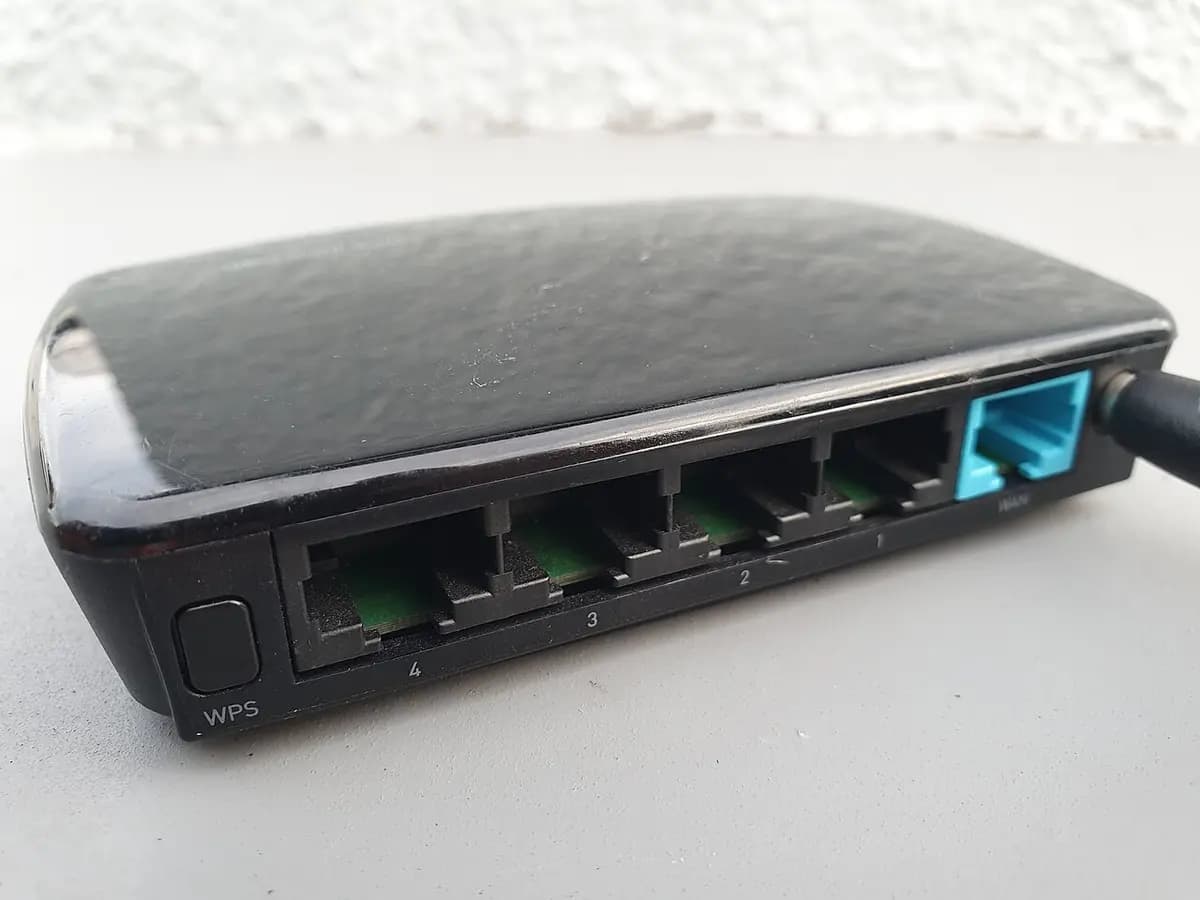
Photo: Syced, Wikimedia Commons, CC0 1.0 licence; image converted to WebP and resized.
How do you secure your guests' Wi-Fi?
The core principle is to give your guests a separate, encrypted network that gives access to nothing but the internet. The CNIL writes that Wi-Fi networks must use state-of-the-art encryption (WPA3 or WPA2, following ANSSI's recommendations) and that networks open to guests must be separated from the internal network. It lists "setting up a Wi-Fi network using WEP encryption" among the things not to do. ANSSI's sheet "Les Essentiels: sécurisation des réseaux Wi-Fi" (version 1.0, August 2026) is written for the professional environment, but its guidance applies well to a host.
| Good practice | Source |
|---|---|
| Separate the guest Wi-Fi from your own devices (camera, computer, home automation) | CNIL, ANSSI: a guest network "dedicated and partitioned from other networks" |
| WPA3 encryption, or properly configured WPA2; never WEP | CNIL, ANSSI |
| Avoid the mixed WPA3/WPA2 mode, which can weaken security | ANSSI |
| Disable WPS (Wi-Fi Protected Setup) | ANSSI: "systematically disable" |
| Change the default network name (SSID) and administration passwords | ANSSI |
| Do not hide the SSID: it is pointless | ANSSI |
| Keep the router up to date | ANSSI, Airbnb |
| Change connection secrets regularly and after an incident | ANSSI |
On the WPS button, visible in the photo above, ANSSI's position is unequivocal: it must be systematically disabled on access points. For the password, ANSSI recommends changing it regularly and without delay after a compromise or suspected compromise. In a rental, changing the password between two stays is a practice we recommend, but it is not an ANSSI requirement.
Airbnb, in its help article on offering internet access to guests, goes in the same direction: create an encrypted guest network (for example WPA2), only share the password once the booking is confirmed, keep the router and modem where guests cannot reach them, and check for updates regularly.
What speed should you advertise, and how do you measure it?
A stable speed matters more than an impressive figure, and the platform that counts most is the one displaying your listing. According to Airbnb, if your Wi-Fi reaches 50 Mbps or more in the app's built-in test, your listing gets a "fast wifi" highlight. The test is run on site, from the iOS or Android app, connected to the property's Wi-Fi; Airbnb states that the host remains responsible for the accuracy of the displayed speed and for its availability throughout the property. The test sends your IP address and connection details to Measurement Lab (M-Lab), something to know before you start it.
As for infrastructure, France is well covered: according to the Arcep press release of 10 September 2026, at the end of June 2026, 43.1 million of 45.2 million premises could be connected to fibre, i.e. 95.3%, and 28.1 million subscriptions were fibre, i.e. 85% of fixed internet subscriptions. 2.1 million premises remain to be made connectable. If your property is in that minority, for example in the countryside, do not promise a speed you have not measured.
Why does speed weigh on your rating? The 2026 Booking.com study cited in our article on what travellers look for according to Booking places fast Wi-Fi among the basic criteria. For business stays, our workation guide details what remote workers expect.
Photo: Al12si, Wikimedia Commons, CC BY-SA 4.0 licence; image converted to WebP and resized.
What should you tell guests about using the Wi-Fi?
A short legal-use notice is useful and easy to add to your welcome book. Airbnb writes that it may be useful to tell guests that, if they use your network, they agree to use it only for legal purposes, with no illegal uploading or downloading. The page does not say that this sentence protects the host legally: it presents it as information to give.
A sample message fits in three lines: the network name, the password, and a usage sentence ("This Wi-Fi is for lawful use only. If the connection drops, restart the box by unplugging the power for 30 seconds, then contact us."). The restart tip is common sense, not an official instruction.
How do you share the password without leaving it lying around?
Give it in the welcome book that the guest receives after the booking is confirmed, rather than on a poster visible from the street. That is also what Airbnb recommends: only give the password once the booking is confirmed. With the Majordia digital welcome book, each property has a guide accessible by QR code, with a Wi-Fi section next to the door code, contacts and emergency numbers, automatically translated into six languages: the guest finds the network name and password in their own language without calling you. This does not change your router's configuration: network security remains your responsibility. For contactless arrivals, see our guide to self check-in; for the structure of a welcome book, our free digital welcome book template.
How do you set up a guest Wi-Fi in five steps?
- Create a guest network in your router or box settings, separate from your main network. If your equipment cannot do this, it is a sign it should be replaced.
- Choose WPA3, or WPA2 failing that, and a long password. Avoid the mixed mode and never keep WEP.
- Disable WPS, change the factory network name and administration password, and update the router.
- Measure the speed on site, in each useful room, and add it to your listing if the platform allows it.
- Ask the legal question to the CNIL or a lawyer if you rent regularly: do you have to keep connection data, and how?
The essentials
Information
- Security: guest network separate from your own devices, WPA3 or WPA2 encryption (never WEP), WPS disabled, administration passwords changed, router up to date (CNIL, ANSSI, Airbnb).
- Connection data: the CNIL requires organisations offering internet access to the public, hotels included, to keep it: 1 year for technical data, 3 months at most for network security data, 5 years for identity only if you identify users. No page we read says whether a private holiday-rental host is covered: ask the CNIL or a lawyer.
- Speed: Airbnb shows "fast wifi" from 50 Mbps measured in the app, and the host is responsible for the accuracy of the figure.
- Coverage: 95.3% of premises can be connected to fibre at the end of June 2026 (Arcep).
- Password: to be given after the booking is confirmed, for example in a digital welcome book.
FAQ
Do you need a separate Wi-Fi network for guests?
Yes, that is what the CNIL (networks open to guests must be separated from the internal network) and ANSSI (a dedicated and partitioned guest network) ask for. It stops a guest from reaching your own connected devices.
Which encryption should you choose for a holiday rental's Wi-Fi?
WPA3, or WPA2 configured according to ANSSI's recommendations. The CNIL lists WEP among the practices to rule out, and ANSSI advises avoiding the mixed WPA3/WPA2 mode.
Do I have to keep my guests' connection data?
The CNIL imposes this retention on organisations that offer internet access to the public (hotels, restaurants, cafés, municipalities): 1 year for technical data. None of the pages we read specifies the case of a private holiday-rental host. Ask the CNIL or a lawyer before opening a guest Wi-Fi.
Do I have to ask for ID to give out the Wi-Fi?
No: according to the CNIL, the organisation offering the access is in principle not required to record its customers' identity in order to provide a connection. If you choose to identify them, the 5-year retention of their identity applies.
From what speed does Airbnb show "fast wifi"?
From 50 Mbps measured with the Airbnb app's test, run on site and connected to the property's Wi-Fi. The host remains responsible for the accuracy of the displayed speed.
Should you change the Wi-Fi password for each stay?
ANSSI recommends changing connection secrets regularly and without delay after a compromise or suspected compromise. Doing so between two stays is a good practice we recommend, not an obligation.
A safe Wi-Fi, honestly advertised
An encrypted guest Wi-Fi, a measured speed and a password given at the right time are enough to avoid most poor ratings linked to the connection. For the question of connection data, do not rely on a forum: the CNIL and a lawyer are the right sources. The digital welcome book plans are detailed on the Pricing page.
Image credits. Cover: photo "White router on white table" by Compare Fibre, Unsplash, Unsplash licence. Illustrations: Syced (CC0 1.0) and Al12si (CC BY-SA 4.0), via Wikimedia Commons; images converted to WebP and resized.


